


 Enterprise Architect
 Pro Cloud Server
 Extensiones MDG

 Foro
Foro Guía del usuario
 Requerir una característica
 Soporte & FAQ
 Noticias
 Ingresar


- Recursos
- Tecnologías MDG
Tecnologías MDG
The Model Driven Generation (MDG) Technologies allow for a logical collection of resources pertaining to a specific technology to be bundled into one centralized location in Enterprise Architect. With MDG Technologies the user has the option of granular importation of UML Profiles, UML Patterns, Code templates and Language types to be contained in a single, easy to access area contained in the the Enterprise Architect Resource View.
To get you started, some MDG Technology files are supplied below for downloading and importing into EA. Over time we will expand the range of Technology files. Some more details on working with MDG Technologies is provided below. MDG Technology Installers provide a convenient installer which handles the installation of the MDG Technology.
MDG Technology installers are distributed in one of two formats. XML files contain the modeling essentials, such as profiles. EXE files include the XML file and handles loading/unloading of technology and other functions such as validation.
| MDG Technology Installers for use with Enterprise Architect version 6.5 (or later) | |
MDG Link for Visio The MDG Link for Visio allows the user to import diagrams created within Visio into an Enterprise Architect model. |
|
 |
VisioImporter.exe |
MDG Technology for BPMN v1.3 The MDG Technology file for Business Process Modeling Notation allows the user to create validated BPMN models within the environment of Enterprise Architect. More Information |
|
|
EABPMN.exe |
|
|
|
|
Iconix_AgileDev.exe |
| MDG Technology Installers for use with Enterprise Architect version 4.5 (or later) | |
MDG Technology for CORBA The MDG Technology file for CORBA allows the user to generate CORBA IDL stubs from existing EA class diagram elements. The MDG Technology for CORBA adds support for IDL to Enterprise Architect. |
|
|
EACorba.exe |
MDG Technology for Python The MDG Technology file for Python is designed to allow the inclusion of the Python grammar, code template and MDG Technology file into EA - Please Note that as from version 6.0 Python support is directly integrated into EA and the MDG Technology for Python is no longer required for users of EA 6.0 and above, users of EA 4.5, 4.51 and 5.0 may still continue to use MDG Technology for Python. |
|
|
EAPython.exe |
| MDG Technology files for use with Enterprise Architect version 4.1 (or later) | |
MDG Technology for Enterprise Java Beans The MDG Technology file for EJB allows the user to model EJB entities and EJB sessions, complete with UML profiles for modeling EJB,EJB patterns and Code Management. |
|
|
EJB Technology.xml |
MDG Technology for Testing The MDG Technology file for Testing give the user the ability to rapidly model a wide range of testing procedures including component testing, SUT, Test Cases and more. |
|
|
Testing Technology.xml |
Working with MDG Technologies in Enterprise Architect |
|
Importing a MDG Technology - EXE file To import a MDG Technology, follow the steps below:
Note: If you do not see the Add-Ins menu in your Main Menu, you may need to reset the menu. The reset button is located in Tools | Customize | Menu. |
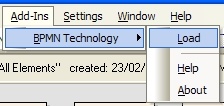 |
Importing a MDG Technology - XML file To import a MDG Technology will need a suitable MDG Technology XML file. If the MDG Technology includes references to any Metafiles, they should be in the same directory as the XML profile.
|
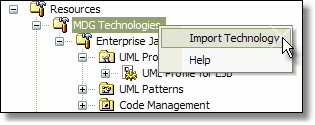 |
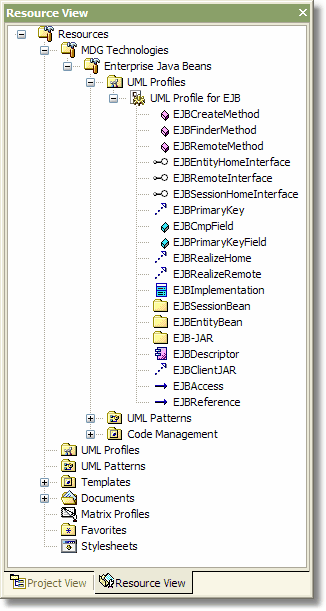
Using MDG Technologies The image displayed to the right details the bundled resources that are available with the MDG Technologies. MDG Technologies give the user all of the flexibility of UML Profiles, UML Patterns, Model Types and Code templates Profile elements contained in MDG technologies can be used in the following manner:
|
 |
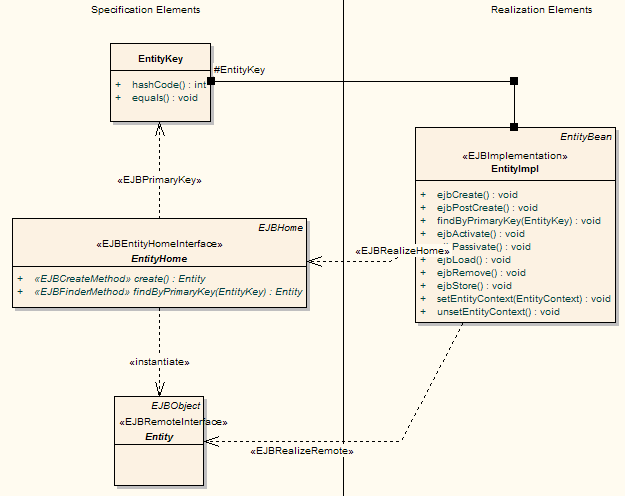
Deleting a MDG Technology To delete a delete a MDG Technology, right click on the MDG Technology to remove and select the 'Delete Technology' context menu option. Note that this will not adversely affect elements already defined using this MDG Technology file. Entity Diagram built with the EJB Technology The diagram below has been built using the MDG EJB Technology file demonstrating the modeling of an EJB Entity |
|
 |
|


